

This is an old revision of the document!
Verilog HDL: The First Example
Module, I/O Ports, Bus, and Assign
A Verilog module of a circuit encapsulates a description of its functionality as a structural or behavioral view of its input-output relationship. A structural view could be as simple as a netlist of gates or as complex as a high level architectural partition of the circuit into major functional blocks, such as an arithmetic and logic unit (ALU). A behavioral view could be a simple Boolean equation model, a register transfer level (RTL), or an algorithm. This section will look at the basics of a Verilog file.
A Simple Example
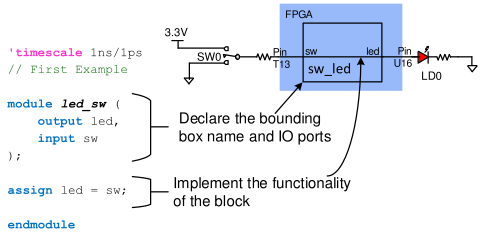
The general format for a Verilog circuit description is shown in the code below in Fig. 1. Required keywords have been shown in blue, comments in green, and key text strings the user must supply are shown in italics.
Module
In a schematic capture environment, a graphical symbol defines a given logic circuit by showing a “bounding box” as well as input and output connections. In Verilog, this same concept is used, only the bounding box must be explicitly typed into the text editor. The bounding box is defined with a module block and a corresponding port statement. The module block (as shown in the example) gives the circuit a name and defines all input and output ports, and so plays the same role as a symbol in a schematic environment. The module is closed by an “endmodule” statement, and all the statement between module declaration and “endmodule” describes the functionality of the module, i.e., the internal circuit connection of the module.
Input, Output, and Bus
Whenever you are writing a Verilog module, the first thing to do is to define the input and output signals. In the example in Fig. 1, there is one input signal “sw” coming from an on-board switch, and one output signal “led” connected to LED0. Note, however, that input and output can be a group of wires as well. We call these groupings a bus. To declare the input or output as a bus, we need to provide the CAD tools with the index of the most significant bit (MSB) of the bus and the index of the least significant bit (LSB) of the bus. For example, the following code defines an 8-bit wide bus “sw”, where the left-most bit (MSB) has the index 7 and the right-most bit (LSB) has the index 0.
input [7:0] sw