

This is an old revision of the document!
Unit 5: IrDA Communications Protocols
Unit 5 Lab
Download This Document
1. Introduction
This unit demonstrates how to use interrupts and the core timer to decode two IrDA protocols, in an effort to teach approaches for decoding different IrDA protocols used for remote device control. The IrDA is an implementation of wireless serial communications capable of simplex as well as half-duplex operation.
I have encountered no fewer than 100 IrDA encoding protocols using pulse modulated infrared beams of light. Of the four IR remote control units I have found around my home, no two use the same encoding scheme. With so many existing IrDA protocols used for remote control devices, I present a method for decoding and encoding the NEC protocol that can be used on different schemes. I have verified this methodology for decoding the Pulse Length (also called Pulse Distance Modulated) protocol. Lab 5 will challenge you to follow the methodology presented to develop an interface for an IrDA remote control device of your own choosing.
Some silicon devices will decode NED encoded IrDA to 9600 Baud UART outputs, such as the ST3679. Other silicon devices will alleviate the burden of pulse encoding and decoding, such as the Microchip MCP2122, which allows direct interface with the processor UART. The above two IrDA hardware devices are designed to implement wireless line-of-sight asynchronous communications and do not interface with NEC IR remote control devices.
2. Objectives:
- Identify the IrDA protocol by capturing the bit stream on the IR_RX pin using the Analog Discovery 2.
- Develop a C function that executes an algorithm to decode the IrDA bit stream.
- Display the received codes on the LCD and send to the UART communications port.
3. Basic Knowledge:
- How to configure I/O pins on a Microchip® PIC32 PPS microprocessor.
- How to configure the Analog Discovery 2 to display logic traces.
- How to implement the design process for embedded processor based systems.
4. Unit Equipment List
4.1. Hardware
- Workstation computer running Windows 10 or higher, MAC OS, or Linux
In addition, we suggest the following instruments:
4.2. Software
The following programs must be installed on your development work station:
5. Project Takeaways
- Understanding of the basics of IrDA protocols.
- Using instrumentation to characterize data streams.
- Use processor external interrupts to decode signal timing patterns.
- Approaches to using state machines to process data.
6. Fundamental Concepts
6.1. IrDA Concepts
It is reported that 99% of all consumer electronics use IrDA remote controllers.1) These remote control devices use low-cost, near infrared LEDs and photo-sensitive transistors to transmit and receive intensity modulated light beams. The fact that these semiconductor devices have a narrow, unobstructed field of view is seen either as a security advantage or a communications limitation, depending on your point of view. This is in comparison to RF communications, such as Bluetooth.
IrDA communications has two major applications: high speed data and remote control. Remote control applications use small data packets at low data rates, whereas high speed data applications require a communications stack to manage the re-assemblage of data packets. Table 6.1 compares the key features of IrDA and Bluetooth.
Table 6.1. IrDA vs. Bluetooth features comparison.2)
| IrDA-Data | Bluetooth | |
|---|---|---|
| Physical Media | Infrared | RF (2.4 GHz) |
| Communications Range | Up to at least 1m | 10cm to 100m |
| Connection Type, Direction | Point-to-Point, Narrow Angle (30 degrees) | Multipoint, Omni-directional |
| Maximum Data Rate | 4Mbps (16Mbps on the way) | 1Mbps (aggregate) |
| Security | Physical limitations offer some built-in protection | Authentication, encryption, spread spectrum |
| Approximate Cost | under $2 | under $5 |
7. Background Information
7.1. IrDA Physical Layer
The Basys MX3 platform is equipped with a Rohm RPM973-H11 infrared communications module that provides the digital interface, as shown in Fig. 7.1. The three microprocessor control pins shown in Fig. 7.2 are the IR_TX, IR_RX, and the IR_PDOWN. The Rohm RPM973-H11 is in a low power mode whenever the IR_PDOWN control signal is in the high state. The IR_PDOWN must be in a low state to transmit or receive infrared signals. Both IR_TX and IR_RX are active low signals.
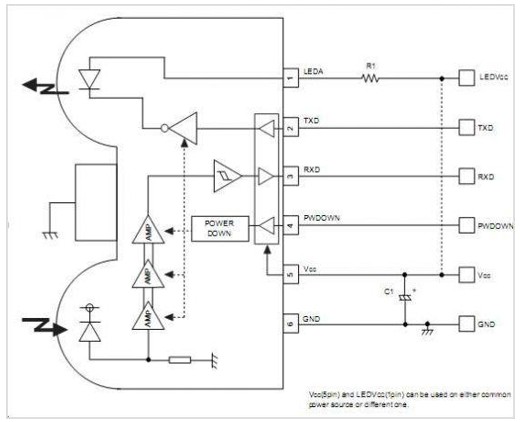 Figure 7.1. RPM973-H11 block diagram.
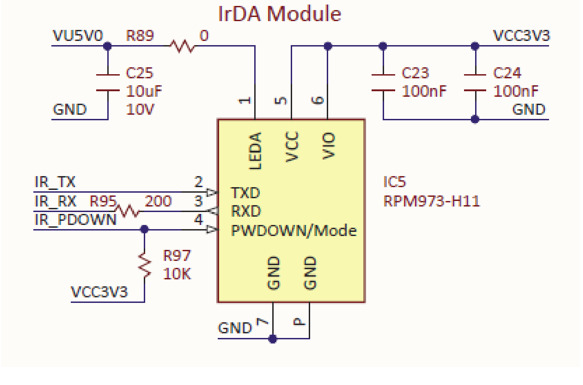 Figure 7.2. Schematic diagram of PIC32 connection to the RPM841-H11 Infrared Module.
Reference 3 lists 21 modulation protocols used for remote control devices. This reference also lists standard carrier frequencies used by these devices. In addition to different kinds of coding and different carrier frequencies, there are further variations in the data formats: with and without pre-burst, with different numbers of bits in a command, and with different bit lengths. As one soon realizes, one must match the IrDA protocol before two IrDA devices can communicate. The IrDA support reported in the PIC32MX370 data sheet (see Section 20 of Reference 6) requires an external IrDA Encoder/Decoder, such as the MC2120 suggested in the Microchip Analog Design Note ADN006. The Basys MX3 processor platform DOES NOT contain any hardware IrDA encoder/decoder. The Rohm RPM973-H11 simply asserts the IR_RX signal low whenever an IR signal of sufficient intensity is detected. Likewise, the IR LED is turned on whenever the IR_TX signal is asserted high. When using the Rohm RPM973-H11 on the Basys MX3 processor platform, all encoding and decoding of the IR pulses must be implemented by the PIC32 processor.
7.2. Characterization of the NEC IrDA Protocol
The NEC protocol will be characterized to illustrate the methodology of discovering the protocol used by an IrDA remote controller. The general procedure is to capture logic analyzer traces and match the data profile to an existing IrDA protocol. This is commonly referred to as reverse engineering.
Figure 7.3 shows that the IR LED modulation for a 38 kHz carrier is determined as the inverse of the period between LED pulses. The LED is only on for about 2.4 μs out of the 26.3 μs carrier frequency period. The duty cycle of the LED is less than 10% resulting in lower power consumption.
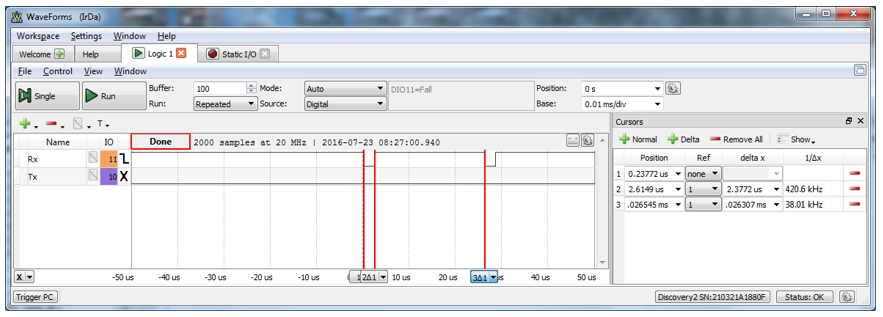 Figure 7.3. IrDA 38 kHz carrier signal.
Figure 7.4 shows a complete IrDA message using the NEC protocol. The signal is low whenever an infrared light is detected. The NEC protocol message contains 32 bits organized in eight bit bytes sent with LSB first. After a 9 ms leader and a 4.5 ms gap, a 560 μs bit marker signals the start of the LSB of the first data byte, as shown in Fig. 7.5.
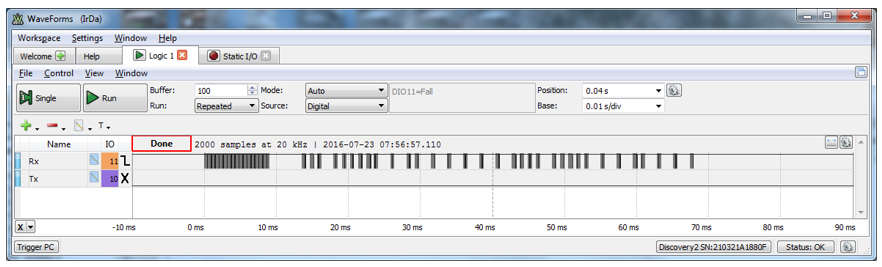 Figure 7.4. Screen capture of a NEC IrDA control message.
Figures 7.5 and 7.6 show expanded views of portions of the NEC IrDA protocol, showing the sync followed by three of the 24 data bits. Note that the differentiation between a ONE bit and a ZERO bit is the length of the gap following each 560 μs period of 38 kHz modulated infrared pulses. The last byte contains 9 pulse bursts to allow the last bit to be framed correctly.
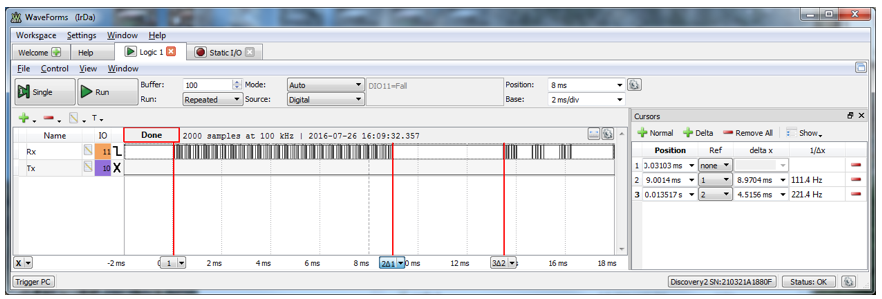 Figure 7.5. Details of the message leader and first three data bits.
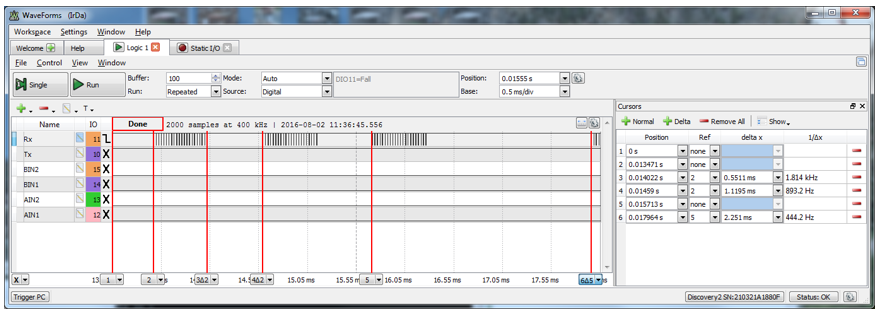 Figure 7.6. 38 kHz pulse burst timing representing two ZERO bits and a ONE bit.
Figures in Reference 4 are reproduced below to illustrate the timing of the NEC protocol. The encoding of an NEC protocol message in Fig. 7.7 shows that the entire packet consists of two bytes of data: the address byte and the command byte. Each byte is followed by its one’s complement. The consequence of this encoding is that although the time to transmit a ONE bit is twice that of transmitting a ZERO bit, the time to send any NEC encoded message is constant regardless of the value of the address and control bytes.
 Figure 7.7. NEC encoded IrDA message.
If the key on the remote control unit is held depressed for longer than 110 ms, a repeat code is continuously sent that contains no address or command data, as illustrated in Fig. 7.8.
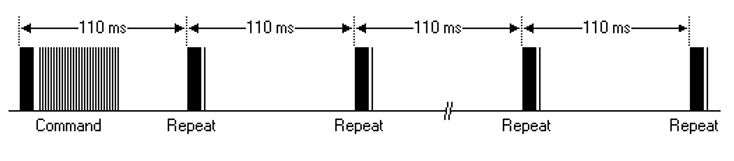 Figure 7.8. Timing diagram of a repeated NEC encoded IrDA message.
7.3. Decoding the NEC IrDA Protocol with the PIC32MX370 Processor
From the previous discussion, it is obvious that the PIC32 UART is not suitable for implementing the IrDA NEC remote control protocol. My investigation of internet documents has not produced any meaningful information as to how to implement this design. From my 30 years of microprocessor design experience, I have concluded that there are two possible approaches: application of digital signal processing concepts, namely Fast Fourier Transforms (FFT), or edge timing using PIC32 Input Compare capability or external interrupts. Interestingly, both methods involve frequency domain concepts.
The modulation and demodulation of the IrDA signal involves binary coding of the 38 kHz carrier signal. As shown above, the bit value information for the NEC protocol is contained in the period length between the 38 kHz IR beam oscillations.
My approach is to first map the PPS input of the IR_RX signal on Port B pin 6 to the external interrupt INT1 as shown in Table 7.1 below. The INT1 is configured to generate an interrupt on the falling (negative) edge of the IR_RX signal using the initialization code shown in Listing 7.1.
Listing 7.1. Initialization of INT1
// Set up IrDA RX interface
   INT1R = 0b00000101;     // Mapping IrDA Rx to RPB6 --> INT1
// Set up INT1 for negative edge triggering
   IEC0bits.INT1IE = 0;    // Disable INT1
   IPC1bits.INT1IP = 2;    // Set Interrupt 1 for priority level 2
   IPC1bits.INT1IS = 0;    // Set Interrupt 1 for sub-priority level 0
   INTCONbits.INT1EP = 0;  // Set for falling edge
   IFS0bits.INT1IF = 0;    // Clear the INT1 interrupt flag
   IEC0bits.INT1IE = 1;    // Enable INT1
Table 7.1. Table 12-1 from the PIC32MX370 datasheet for the PPS Input Pin Selection for the PIC32MX370 Processor.
| Peripheral Pin | [pin name]R SFR | [pin name]R bits | [pin name]R Value to RPn Pin Selection |
|---|---|---|---|
| INT1 | INT1R | INT1R<3:0> | 0000 = RPD1 0001 = RPG9 0010 = RPB14 0011 = RPD0 0100 = RPD8 0101 = RPB6 0110 = RPD5 0111 = RPB2 1000 = RPF3(4) 1001 = RPF13(3) 1010 = Reserved 1011 = RPF2(1) 1100 = RPC2(3) 1101 = RPE8(3) 1110 = Reserved 1111 = Reserved |
| T3CK | T3CKR | T3CKR<3:0> | |
| IC1 | IC1R | IC1R<3:0> | |
| $\overline{(U3CTS)}$ | U3CTSR | U3CTSR<3:0> | |
| U4RX | U4RXR | U4RXR<3:0> | |
| U5RX | U5RXR | U5RXR<3:0> | |
| $\overline{(SS2)}$ | SS2R | SS2R<3:0> | |
| OCFA | OCFAR | OCFAR<3:0> |
- This selection is not available on 64-pin USB devices.
- This selection is only available on 100-pin General Purpose devices.
- This selection is not available on 64-pin USB and General Purpose devices.
- This selection is not available when USBID functionality is used.
When the interrupt occurs, the value of the core timer operating at 40 MHz is captured. The previous core timer value is subtracted from the present core timer value to determine the period between interrupts. If this period is approximately 560 μs, a 38 kHz signal is present. The actual IR pulse length is of little concern provided it is sufficiently long to generate a processor interrupt. For our characterization case, the actual measured IR beam pulse width is 2.377 μs.
Listing 7.2 shows the C code implementing the INT1 ISR. The time between interrupts contains the needed information, hence variable “t1_2” must be declared as static. The static variable, “start_timing” remembers that the variable “t1_2” has been initialized after a system reset. The only information needed by the NEC decoding algorithm is the time since the last interrupt.
6.3. UART Hardware
The Basys MX3 processor board uses an FTDI USB to serial adaptor that interfaces directly with the PIC32MX370 UART pins, as shown in Fig. A.1, with the physical location of the UART USB connector shown in Fig. A.2. The UART_RX and UART_TX connect to the PIC32MX370 processor I/O pins RF12R and RF13R respectively. The result of this wiring will be discussed below in the UART Software section. When the USB cable is connected to both the PC and J10 of the Basys MX3 processor board, the PC software will automatically enumerate the connection to a COMM port. To determine which COMM port is enumerated, you will need to click on the Windows Start icon in the lower left corner followed by clicking on “Device Manager” and then on “Ports (COM & LPT).” You will then see a listing as “USB Serial Port (COM##)” where “##” is the COMM number used when you open the terminal emulation application.
6.4. UART Software
As stated above, the UART_TX and UART_RX connect to the PIC32MX370 processor I/O pins RF12R and RF13R respectively. Table 6.1 shows that port F, pin 13 is mapped to U4RX using the C program statement “U4RXR = 0x09;”. Similarly, Table 6.2 shows that port F, pin 12 is mapped to U4TX using the C program statement “RPF12R = 0x02;”. After the PPS pin mapping shown in Listing B.1, all serial communications will use UART 4. The complete function to initialize UART 4 is shown in Listing B.1.
Table 6.1. PPS mapping of PIC32 port F pin 13 to UART 4 receive adapted from PIC32MX330/350/370/430/450/470 Family Data Sheet, Table 12-1.
| Peripheral Pin | [pin name]R SFR | [pin name]R bits | [pin names]R Value to RPn Pin Selection |
|---|---|---|---|
| INT1 | INT1R | INTR<3:0> | 0000 = RPD1 0001 = RPG9 0010 = RPB14 0011 = RPD0 0100 = RPD8 0101 = RPB6 0110 = RPD5 0111 = RPB2 1000 = RPF3(4) 1001 = RPF13(3) 1010 = Reserved 1011 = RPF2(1) 1100 = RPC2(3) 1101 = RPE8(3) 1110 = Reserved 1111 = Reserved |
| T3CK | T3CKR | T3CKR<3:0> | |
| IC1 | IC1R | IC1R<3:0> | |
| $\overline{(U3CTS)}$ | U3CTSR | U3CTSR<3:0> | |
| U4RX | U4RXR | U4RXR<3:0> | |
| U5RX | U5RXR | U5RXR<3:0> | |
| $\overline{(SS2)}$ | SS2R | SS2R<3:0> | |
| OCFA | OCFAR | OCFAR<3:0> |
**Table 6.2. PPS mapping of PIC32 port F pin 12 to UART 4 transmit adapted from PIC32MX330/350/370/430/450/470 Family Data Sheet, Table 12-2.
| RPn Port Pin | RPnR SFR | RPnR bits | RPnR Value to Peripheral Seleciton |
|---|---|---|---|
| RPD9 | RPD9R | RPD9R<3:0> | 0000 = No Connect 0001 = $\overline{(U3RTS)}$ 0010 = U4TX 0011 = REFCLKO 0100 = U5TX 0101 = Reserved 0110 = Reserved 0111 = $\overline{(SS1)}$ 1000 = SDO1 1001 = Reserved 1010 = Reserved 1011 = OC5 1100 = Reserved 1101 = C1OUT 1110 = Reserved 1111 = Reserved |
| RPG6 | RPG6R | RPG6R<3:0> | |
| RPB8 | RPB8R | RPB8R<3:0> | |
| RPB15 | RPB15R | RPB15R<3:0> | |
| RPD4 | RPD4R | RPD4R<3:0> | |
| RPB0 | RPB0R | RPB0R<3:0> | |
| RPE3 | RPE3R | RPE3R<3:0> | |
| RPB7 | RPB7R | RPB7R<3:0> | |
| RPB2 | RPB2R | RPB2R<3:0> | |
| RPF12(4) | RPF12R | RPF12R<3:0> | |
| RPD12(4) | RPD12R | RPD12R<3:0> | |
| RPF8(4) | RPF8R | RPF8R<3:0> | |
| RPC3(4) | RPC3R | RPC3R<3:0> | |
| RPE9(4) | RPE9R | RPE9R<3:0> |
- This selection is not available on 64-pin USB devices.
- This selection is only available on 100-pin General Purpose devices.
- This selection is not available on 64-pin General Purpose devices.
- This selection is not available when USBID functionality is used.
The C language “printf” function will output text to UART 4 if the “mon_putc(char c)” function, as shown in Listing B.2, is added to the project.
Listing B.3 and B.4 show the code for sending and receiving a single character. These functions are non-blocking, unlike the “_mon_putc” function in Listing B.2. Hence, the calling function is responsible for verifying that the “putcU4” and “getcU4” functions have completed the requested action by returning a logical TRUE (non-zero value). Non-blocking communications allow the microprocessor to service other tasks that may have more critical timing requirements. In both the non-blocking and blocking functions, the completion of the task depends on the completion of some of the action. When sending data, the processor must wait until the UART has shifted out all the bits of the data byte. When receiving data, the processor must wait on the sending device. Both the “putcU4” and the “getcU4” can be implemented in a blocking fashion by simply calling the function in a while loop, such as while(!putchU4(ch));.
The primitive functions provided by the code in Listing B.1 through Listing B.4 provide the building blocks of asynchronous communications and will be used to complete the application assignment for Labs 4a and 4b.
7. Background Information
See the general discussion concerning computer communications discussed in Unit 4 Part 1.
8. References
- PIC32MX330/350/370/430/450/470 Family Data Sheet
- “Using the USART in Asynchronous Mode”, http://ww1.microchip.com/downloads/en/DeviceDoc/usart.pdf
- “Asynchronous Communications with the PICmicro® USART”, http://ww1.microchip.com/downloads/en/AppNotes/00774a.pdf
- Embedded Computing and Mechatronics with the PIC32 Microcontroller, 1st Edition, by Kevin Lynch (Author), Nicholas Marchuk (Author), Matthew Elwin (Author), https://www.amazon.com/Embedded-Computing-Mechatronics-PIC32-Microcontroller/dp/0124201652
- “PIC32MX330/350/370/430/4450/470 32 Bit Microcontroller Datasheet (60001185E)”, http://ww1.microchip.com/downloads/en/DeviceDoc/60001185E.pdf
- “Using the USART in Asynchronous Mode”, http://ww1.microchip.com/downloads/en/DeviceDoc/usart.pdf
Appendix A: Unit 4 Part 2 Parts Configuration
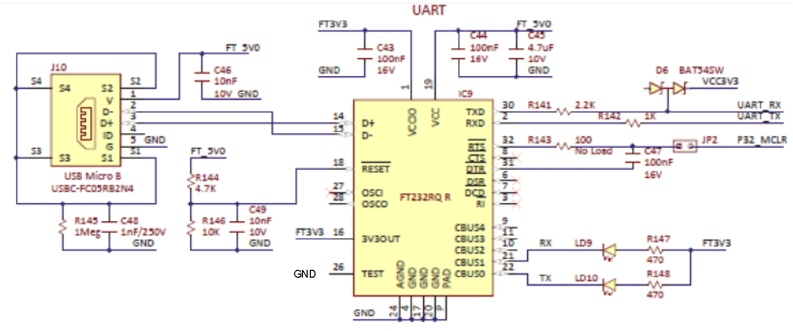 Figure A.1. PIC32 to FT232RQR IC schematic diagram.
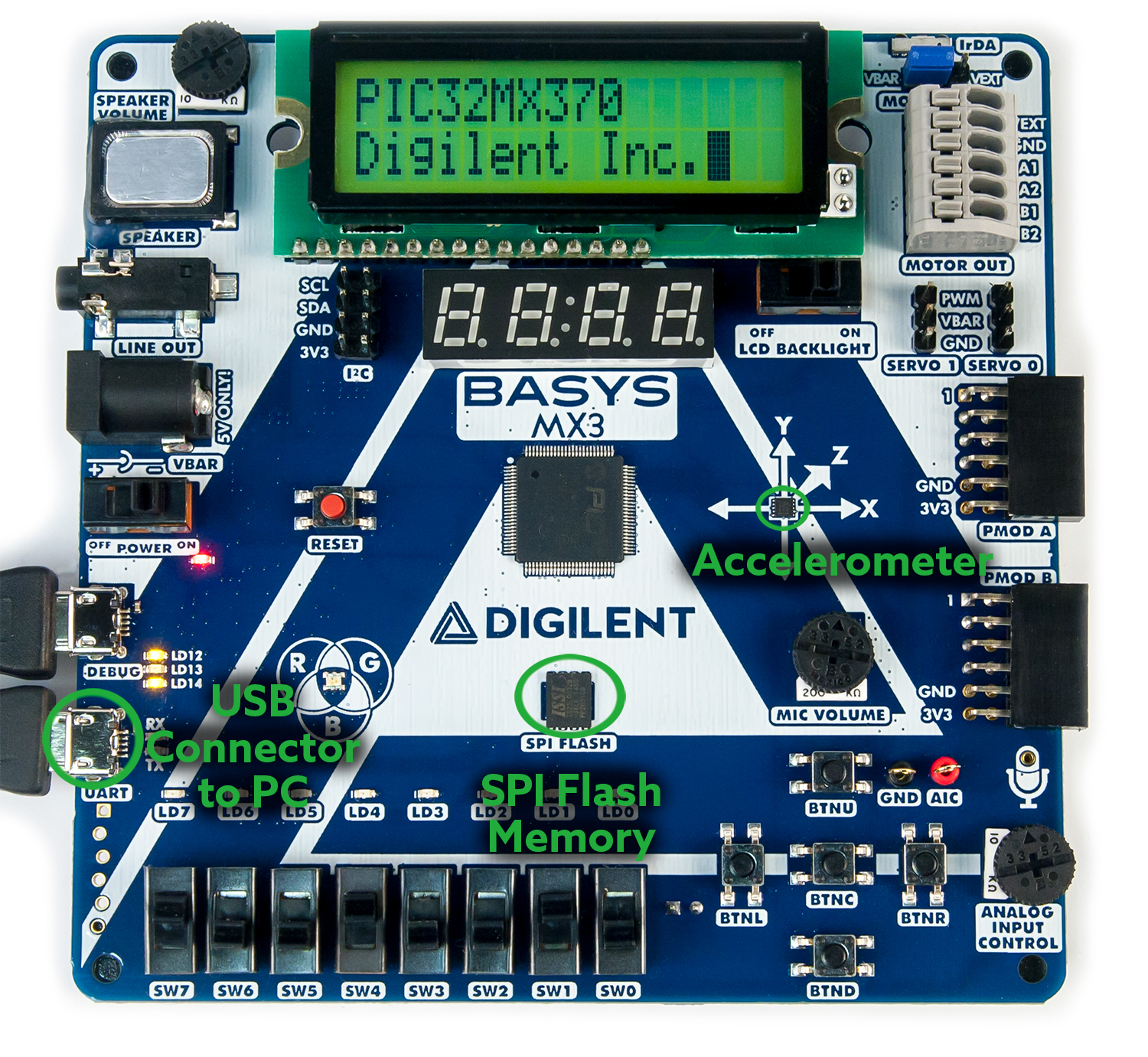 Figure A.2. Unit 4 hardware and instrumentation configuration.
Appendix B: Lab 4a and 4b UART Functions
Listing B.1. C Function that Initializes PF12 and PF13 to UART 4
void uart_init(unsigned int baud, int parity)
{
// The next two statements map the PPS IO pins to the UART 4 Tx and Rx
   RPF12R = 0x02;  // Mapping U4TX to RPF12;
   U4RXR = 0x09;   // Mapping U4RX to RPF13

   UARTConfigure(UART4, UART_ENABLE_PINS_TX_RX_ONLY );
   UARTSetDataRate(UART4, GetPeripheralClock(), baud);	// Set UART data rate
// Note the need to specify the UART number twice in the following statement
   UARTEnable(UART4, UART_ENABLE_FLAGS(UART_ENABLE | UART4 | UART_RX | UART_TX));
   switch(parity)
   {
       case NO_PARITY:
           UARTSetLineControl(UART4, UART_DATA_SIZE_8_BITS | UART_PARITY_NONE |\
                              UART_STOP_BITS_1);
           break;
       case ODD_PARITY:
           UARTSetLineControl(UART4, UART_DATA_SIZE_8_BITS | UART_PARITY_ODD |\
                              UART_STOP_BITS_1);
           break;
       case EVEN_PARITY:
           UARTSetLineControl(UART4, UART_DATA_SIZE_8_BITS | UART_PARITY_EVEN |\
                              UART_STOP_BITS_1);
           break;
   }
   printf("\n\rUART Serial Port 4 ready\n\n\r");
Listing B.2. C code to allow the “printf” output to be redirected to UART 4
void _mon_putc(char c)
{
   while(!UARTTransmitterIsReady(UART4));
   UARTSendDataByte(UART4, c);
} /* End of _mon_putc */
Listing B.3. C Code for Sending a Single Character to UART 4
BOOL putcU4( int ch)
{
UART_DATA c;
BOOL done = FALSE;
   c.data8bit = (char) ch;
   if(UARTTransmitterIsReady(UART4))
   {
   	UARTSendDataByte(UART4, c.data8bit);
	done = TRUE;
   }
  return done;
} /* End of putU4 */
Listing B.4. C Code for Receiving a Single Character from UART 4
BOOL getcU4( char *ch)
{
UART_DATA c;
BOOL done = FALSE;
   if(UARTReceivedDataIsAvailable(UART4))	/* wait for new char to arrive */
   {
       c = UARTGetData(UART4);	/* read the char from receive buffer */
       *ch = (c.data8bit);
       done = TRUE;		/* Return new data available flag */
   }
   return done;           /* Return new data not available flag */
}/* End of getU4 */
Appendix C: Common Definitions
- UART: A Universal Asynchronous Receiver/Transmitter, abbreviated UART, is a type of “asynchronous receiver/transmitter,” a piece of computer hardware that translates data between parallel and serial forms. UARTs are commonly used in conjunction with communications standards such as EIA, RS-232, RS-422, or RS-485 that describe physical layers.
- Communications Speed: BAUD is a unit used to measure the speed of signaling or data transfer, equal to the number of pulses or bits per second, or baud rate.
- Data Rate: Typical data rates are multiples of 120 BAUD to 115.2 KB.
- Stop Bits: Only one is necessary for the receiving device. The sending device has the option of sending one or two minimum stop bits.
- Bus Idle: This is the nominal state of the data signal when no data is being transmitted. The idle condition is a logic level 1 (or high condition). The bus idle condition is an extension of stop bits; however, the period bus idle condition may be any time duration.
- Parity: Used for single bit error detection.
- None – no error checking
- Even parity refers to a parity checking mode in asynchronous communication systems in which an extra bit, called a parity bit, is set to one if there is an odd number of one bits in a one-byte data item.
- Odd parity refers to a parity checking mode in asynchronous communication systems in which an extra bit, called a parity bit, is set to one if there is an even number of one bits in a one-byte data item.
- Information direction:
- Simplex – communications is one direction only
- Full-duplex – bi-directional simultaneous asynchronous communications
- Half-duplex – bi-directional exclusive communications. Devices can send and receive, but not simultaneously.
1)
“What is infrared?” http://irdajp.info/what.html