Table of Contents
Zybo DMA Audio Demo
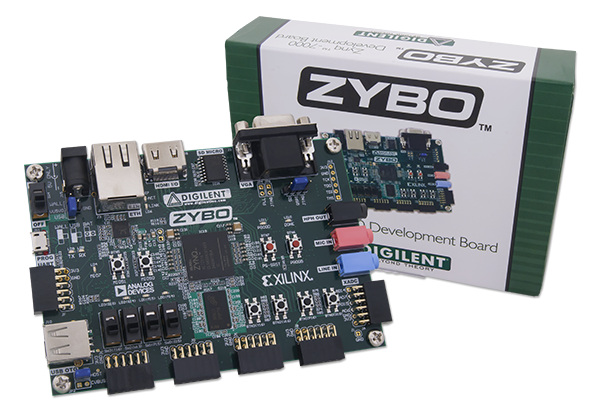
Overview
Features Used
| Not Used | Used | |
|---|---|---|
| 4 user switches | X | |
| 4 user LEDs | X | |
| 5 user push buttons | X | |
| USB-UART Bridge | X | |
| Micro SD card connector | X | |
| HDMI Sink and HDMI Source | X | |
| 16 Bit VGA port | X | |
| Audio codec w/ three 3.5mm jacks | X | |
| User EEPROM | X | |
| 10/100/1000 Ethernet PHY | X | |
| 512MiB 800Mt/s DDR3 Memory | X | |
| Serial Flash | X | |
| Five Pmod ports | X | |
| Pmod for XADC signals | X | |
| USB HID Host | X |
Description
The audio demo records a 5 second sample from microphone(J6) or line in (J7) and plays it back on a headphone out(J5). Record and playback is started by push buttons:
| Button | Function |
|---|---|
| BTN1 | record from mic in |
| BTN2 | play on hph out |
| BTN3 | record from line in |
Prerequisites
Skills
- Basic familiarity with Vivado
- This experience can be found by walking through our “Getting Started with Vivado” guide
Hardware
- Zybo FPGA board
- Micro-USB cable
- Headphones or Speakers
- Audio Input device (Aux-In, Guitar, etc.)
Software
- Vivado Design Suite 2016.X
- Newer/older versions can be used, but the procedure may vary slightly
Downloads
Download and Launch the Zybo DMA Audio Demo
Follow the tutorial for Getting Started with a Digilent Github project. Since this is a Vivado SDK Project, you can either directly launch SDK and import the hardware handoff, or you can generate a bitstream in Vivado before launching SDK. Select the hardware handoff options in the tutorial if you don't want to modify the project block design later.
Running the Zybo DMA Audio Demo
This portion will help you run the demo and observe all its features.
1. Set up the Demo
1.1) In order to use the demo, you will need to plug in your microphone or aux input into the respective jack on your Zybo. Plug your speakers/headphones into the Line out jack. Make sure that the demo is running on your board, if not, revisit the programming step of the Getting Started Tutorial.

1.2) Once the board is programmed, you can open a serial terminal (Such as TeraTerm) on your computer to receive status messages. Set up the serial port to connect to the appropriate port for your board, and for a baud rate of 115200.

2. Recording from an input
To record from the microphone input, press btn1. To record from the line input, press btn3. Once the recording is activated, the message “Start Recording…” will be sent over UART and the demo will record 5 seconds of audio. If any buttons are pressed during the recording, the message “Still Recording…” will be sent over UART.
3. Playing to an output
To play to the headphone output, press btn2. Once the playback is activated, the message “Start Playback…” will be sent over UART and the demo will play 5 seconds of audio. If any buttons are pressed during the playback, the message “Still Playing…” will be sent over UART.