Table of Contents
Nexys Video Looper Demo
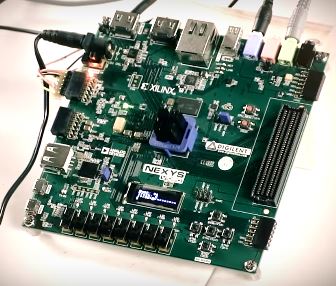
Overview
Features Used
| Not Used | Used | |
|---|---|---|
| 8 user switches | X | |
| 8 user LEDs | X | |
| 128×32 monochrome OLED display | X | |
| USB-UART Bridge | X | |
| 160-pin FMC LPC connector | X | |
| Micro SD card connector | X | |
| HDMI Sink and HDMI Source | X | |
| DisplayPort Source | X | |
| Audio codec w/ four 3.5mm jacks | X | |
| 6 user push buttons | X | |
| User EEPROM | X | |
| 10/100/1000 Ethernet PHY | X | |
| 512MiB 800Mt/s DDR3 Memory | X | |
| Serial Flash | X | |
| Four Pmod ports | X | |
| Pmod for XADC signals | X | |
| USB HID Host | X |
Description
This project demonstrates the usage of the Nexys Video's audio codec and DDR3 memory. The behavior is as follows:
- The looper has 16 'banks' that can contain audio data. The user can record audio tracks to these banks and play them back simultaneously.
- Audio data is constantly sampled at 48 KHz through the Line In input jack and output through the Line out jack.
- When the record button is pressed, the timer on the 7-segment display is started, and the audio data is recorded into one bank.
- If the record button is pressed again, the length of the loop is saved and the audio data is read from beginning to end and mixed with the input signal.
- If the stop button is pressed while recording, the data is overwritten with a blank signal and the data is erased.
- While a bank is playing, the user can record additional tracks on other banks by pressing BTNL or BTNR to select another bank to record to. If the user presses play/record on a bank that is already playing, it will overwrite the audio on that bank.
- Holding the stop button on any specific bank for 1.5 seconds will delete it.
- The OLED shows the state of each bank as well as the current progress of the loop you are in.
- BTNU swaps which selection of banks you are using. SW0 selects which selection of banks you are editing. Leave this in the 'off' position for now. This will be described below.
| Button | Function |
|---|---|
| BTNL | Back one bank |
| BTNR | Forward one bank |
| BTNC | Play/Record |
| BTND | Stop/Erase |
| BTNU | Swap Track |
| SW0 | Selects which track you are editing (described below) |
| Bank State | Description |
|---|---|
| X | Bank is empty |
| Circle | Bank is recording |
| Right arrow | Bank is playing |
| Square | Bank is stopped |
Prerequisites
Skills
- Basic familiarity with Vivado
- This experience can be found by walking through our “Getting Started with Vivado” guide
Hardware
- Nexys Video FPGA board
- Micro-USB cable
- Nexys Video Power Supply
- Headphones or Speakers
- Audio Input device (Aux-In, Guitar, etc.)
Software
- Vivado Design Suite 2015.X
- Newer/older versions can be used, but the procedure may vary slightly
Downloads
How to...
1. Setup
1.1)Plug in your input to the Line in jack on your Nexys Video. Plug your speakers/headphones into the Line out jack. Plug in your Nexys Video and power it on.
2. Build the Project
2.1) Click Generate Bitstream on the left hand menu towards the bottom. Vivado will run through both Run Synthesis and Run Implementation before it generates the bitstream automatically.
Note: If you want, you can click each step by itself in the order of Run Synthesis, Run Implementation and then Generate Bitstream.

3. Program the Board
3.1) Once you have generated your bit file, Click on the hardware manager and connect to your board by choosing the local server option.

3.2) Click program to load the project onto your Nexys Video.
4. Run the Project
This portion will help you run the demo and observe all its features.
4.1) Initial State
Initially, the OLED will look like the picture below. Audio data should be streaming from the input to the output. Press CPU_RESET if this is not the case. Also, make sure SW0 is switched down (Off).

4.2) Switching banks
Press BTNR to move right one bank or press BTNL to move left one bank. This will be shown on the screen as the highlighted bank on the third line. Bank 2 is selected below.

4.3) Recording to a bank
Press the play/record button (BTNC) to start recording to whichever bank you are on. The highlighted X will be replaced with a circle, shown below.

4.4) Saving the loop
When you have finished recording, press the play/record button again. The circle will be replaced with a 'play' icon, and the audio will begin playing back from beginning to end. The progress bard on line 4 will show how far the loop has progressed until it restarts.

4.5) Stopping the loop
Press the stop button on a bank that is currently playing, to stop playback on that bank. The 'play' icon will changed to a square, meaning it is stopped. If no other banks are playing, the looper will stop showing the progress bar below.

4.6) Recording to another bank
Press BTNC again on the bank to resume playback, then press BTNL or BTNR to change to another bank that is not recorded on and press the play/record button to start recording to the new bank.
When finished, press play/record again and the bank will be saved.

4.7) Canceling a recording
If, while recording, you want to cancel the recording, you can press the stop button and it will erase the bank.
4.8) Erasing an already recorded bank
Hold down the stop button for 1.5 seconds to erase the data on the corresponding bank.
4.9) Using the 'swap track' feature
After recording to several banks, you can quickly swap between two playing states by using BTNU. First, record a few tracks.
Flip SW0 to the up (on) position to see which banks will be playing on the other track. You can then go through and select which banks will play on this other track by scrolling through with BTNL and BTNR and playing or stopping the banks with BTNC and BTND. When your selections are made, switch SW0 back to the off position and press BTNU. A swap icon will show up, letting you know that the track will with switched at the end of the loop.
At the end of the loop, the track number will switch to '1', and the bank selections you made earlier will be played back.


4.10) Resetting the looper
Press the CPU_RESET button to return the device to its initial state.