Table of Contents
Unit 4 Part 2: Communications - Asynchronous Serial Protocols
Download This Document
1. Introduction
Asynchronous communication is the transmission of data between two devices that are not synchronized with one another via a clocking mechanism or other technique. Data is exchanged in blocks of a fixed number of bits that are bracketed by a START and STOP bit. The term asynchronous implies the sender can initiate data transmission at any time, and the receiver must be ready to accept information when it arrives. The two devices must be operating at or nearly equal to the same frequency.
2. Objectives:
- Program the PIC32MX370 to use the Universal Asynchronous Receiver Transmitter (UART) serial communications to display data on a computer using a terminal emulation program.
- Control the stepper motor speed and direction of rotation using commands entered from a terminal emulation program.
- Display serial communications on the LCD and PC terminal.
3. Basic Knowledge:
- How to map PIC32MX370 I/O pins to special function registers.
- How to initialize special functions using the PLIB functions.
4. Unit Equipment List
4.1. Hardware
- Workstation computer running Windows 10 or higher, MAC OS, or Linux
- 4-wire stepper motor (Lab 4b only)
- 5V, 4A DC power supply (Lab 4b only)
In addition, we suggest the following instruments:
4.2. Software
The following programs must be installed on your development work station:
5. Project Takeaways
- Understanding of the basics of telecommunications.
- Understanding of requirements and implementations of asynchronous communications.
- Application of asynchronous communications
- Knowledge of a PC terminal emulation program.
- How to develop a library of PIC32 software to provide bi-directional communications of single characters and strings of characters.
- How to use the UART for diagnostics and as a human-machine interface (HMI).
- How to recognize the handshaking methods used in a communications protocol.
- How to setup the Analog Discovery 2 to display UART waveforms.
6. Fundamental Concepts
6.1. Asynchronous Communications
Serial communications is the process of sending data one bit at a time, sequentially, over a communication channel or computer bus. This is in contrast to parallel communication where several bits are sent as a whole on a link with several parallel channels. Both parallel and serial communications have handshaking requirements to synchronize data transfers. Although parallel communications generally has a speed advantage over serial communications, the primary advantage for serial communications is the reduced number of processor I/O pins and connecting wires or conductors.
Although some references claim that asynchronous communications take place outside of real-time, this does not mean that timing is not critical to the transmission of data. Each data symbol is uniform in period and has critical timing requirements. In digital communications, symbol rate (also known as baud or modulation rate) is the number of symbol changes (waveform changes or signaling events) made to the transmission medium per second using a digitally modulated signal or a line code. The symbol rate is measured in baud or symbols/second. Each symbol can represent or convey one or several bits of data. The symbol rate is related to, but should not be confused with, the gross bit rate expressed in bits/second. (See Symbol Rate.)
A user unfamiliar with asynchronous communications and UART operations should refer to Reference 3 in section 8 of this document. Asynchronous communications is a serial data protocol that has been in use for many years. Normally, eight bits of data are transmitted at a time. There are other less commonly used modes that can send 5, 6, or 7 bits of data. Each byte of data is framed by a start bit and a stop bit. A symbol is defined as a start, data, parity, or stop bit. It is common to define communications speed as bits per second. The bit rate is defined as the inverse of the period of a unit symbol. Although the common standard bit rates are 50, 75, 110, 134, 150, 200, 300, 600, 1200, 1800, 2400, 4800, 9600, 19200, 38400, 57600, and 115200, communications is possible at any rate provided that the sender and receiver use the same rate. For most asynchronous communications, the term “baud” is commonly used interchangeably with the term “bit rate.”
Figure 6.1 shows a typical asynchronous transmission of two 8-bit data bytes. We see that the idle state of the transmit signal is a logic one, or a high voltage level. A START bit is signified by a high to low transition and remains low for one symbol time. The START bit is followed by eight data bits with the least significant bit being sent first. A logic zero is sent when the signal is a low voltage level for one symbol time. Similarly, a logic one is sent when the signal is a high voltage level for one symbol time. After the transmitting of the data there may be an optional parity bit. The parity bit is used for error detection and can be set for even parity or odd parity. For even parity, the parity bit is set high if the number of ones in the preceding eight data bits are odd, thus making the total number of 1’s in the data plus parity bit even. Conversely, for odd parity, the parity bit is set high if the number of ones in the 8 data is even. The data byte is terminated with one or more successive stop bits. Stop bits are always a logic 1 or high voltage level. If the signal remains high for longer than one symbol period, the stop bit can be thought of as the stop or idle period and the communications signal may remain in the idle condition an arbitrarily long period of time.
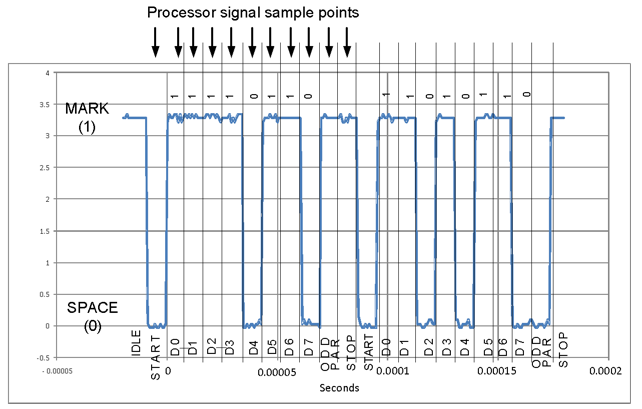 Figure 6.1. Example of 115 kB asynchronous serial data stream with odd parity.
The receiving device unit must use the same bit rate as the sending unit. In the process of receiving serial communications, a processor may generate up to three error flags. A parity error is generated if the parity bit is the incorrect voltage level. The second type of error is a framing error that is generated if a low voltage level is received in the stop bit position. Thirdly, an overrun error is generated if a software instruction does not read the data byte from the receive buffer before the next byte of data is completely received, resulting in the new data byte overwriting the previous data byte.
Each new start bit synchronizes the sampling of the receiving unit. Generally, the receiver recovers the transmission using a clock that is an even multiple of the bit rate. When the receiving unit detects the falling edge of the START bit, it waits one half the symbol period and samples the receive data line. This is illustrated by the processor sample points in Fig. 6.1. If the logic state of the line is zero, then it is recognized as a valid start condition. The receiver then waits full periods to sample the receive data line until all data bits, plus any parity bit, plus the stop bit have been received. If a stop bit is not received, a framing error is generated.
Just like with parallel communications, there are three modes of serial communications: full-duplex, half-duplex, and simplex. Full-duplex describes the operation when a device can simultaneously send and receive data. Half-duplex operation allows both sending and receiving, but not simultaneously. Simplex operations are where the device can only send or receive data.
The actual data rate is defined as the number of data bits per unit time. Data efficiency is defined as the number of data bits divided by the total number of bits. The efficiency of asynchronous serial communications is at best 80% because there are always two extra data bits (start and stop bit) sent for each 8 data bits. If parity is used, the efficiency drops to 73% because 11 bits are needed to communicate 8 bits of data.
6.2. UART and FTDI-232
The PIC32 processors, as do most microprocessors, have a UART hardware embedded inside. “A universal asynchronous receiver/transmitter, abbreviated UART /ˈjuːɑːrt/, is a computer hardware device that translates data between characters (usually bytes) in a computer and an asynchronous serial communication format that encapsulates those characters between start bits and stop bits. UARTs are commonly used in conjunction with communication standards such as TIA (formerly EIA) RS-232, RS-422 or RS-485. The universal designation indicates that the data format and transmission speeds are configurable. The electric signaling levels and methods (such as differential signaling, etc.) are handled by a driver circuit external to the UART.”1) (Refer to Appendix C for commonly used definitions.)
6.3. UART Hardware
The Basys MX3 processor board uses an FTDI USB to serial adaptor that interfaces directly with the PIC32MX370 UART pins, as shown in Fig. A.1, with the physical location of the UART USB connector shown in Fig. A.2. The UART_RX and UART_TX connect to the PIC32MX370 processor I/O pins RF12R and RF13R respectively. The result of this wiring will be discussed below in the UART Software section. When the USB cable is connected to both the PC and J10 of the Basys MX3 processor board, the PC software will automatically enumerate the connection to a COMM port. To determine which COMM port is enumerated, you will need to click on the Windows Start icon in the lower left corner followed by clicking on “Device Manager” and then on “Ports (COM & LPT).” You will then see a listing as “USB Serial Port (COM##)” where “##” is the COMM number used when you open the terminal emulation application.
6.4. UART Software
As stated above, the UART_TX and UART_RX connect to the PIC32MX370 processor I/O pins RF12R and RF13R respectively. Table 6.1 shows that port F, pin 13 is mapped to U4RX using the C program statement “U4RXR = 0x09;”. Similarly, Table 6.2 shows that port F, pin 12 is mapped to U4TX using the C program statement “RPF12R = 0x02;”. After the PPS pin mapping shown in Listing B.1, all serial communications will use UART 4. The complete function to initialize UART 4 is shown in Listing B.1.
Table 6.1. PPS mapping of PIC32 port F pin 13 to UART 4 receive adapted from PIC32MX330/350/370/430/450/470 Family Data Sheet, Table 12-1.
| Peripheral Pin | [pin name]R SFR | [pin name]R bits | [pin names]R Value to RPn Pin Selection |
|---|---|---|---|
| INT1 | INT1R | INTR<3:0> | 0000 = RPD1 0001 = RPG9 0010 = RPB14 0011 = RPD0 0100 = RPD8 0101 = RPB6 0110 = RPD5 0111 = RPB2 1000 = RPF3(4) 1001 = RPF13(3) 1010 = Reserved 1011 = RPF2(1) 1100 = RPC2(3) 1101 = RPE8(3) 1110 = Reserved 1111 = Reserved |
| T3CK | T3CKR | T3CKR<3:0> | |
| IC1 | IC1R | IC1R<3:0> | |
| $\overline{(U3CTS)}$ | U3CTSR | U3CTSR<3:0> | |
| U4RX | U4RXR | U4RXR<3:0> | |
| U5RX | U5RXR | U5RXR<3:0> | |
| $\overline{(SS2)}$ | SS2R | SS2R<3:0> | |
| OCFA | OCFAR | OCFAR<3:0> |
**Table 6.2. PPS mapping of PIC32 port F pin 12 to UART 4 transmit adapted from PIC32MX330/350/370/430/450/470 Family Data Sheet, Table 12-2.
| RPn Port Pin | RPnR SFR | RPnR bits | RPnR Value to Peripheral Seleciton |
|---|---|---|---|
| RPD9 | RPD9R | RPD9R<3:0> | 0000 = No Connect 0001 = $\overline{(U3RTS)}$ 0010 = U4TX 0011 = REFCLKO 0100 = U5TX 0101 = Reserved 0110 = Reserved 0111 = $\overline{(SS1)}$ 1000 = SDO1 1001 = Reserved 1010 = Reserved 1011 = OC5 1100 = Reserved 1101 = C1OUT 1110 = Reserved 1111 = Reserved |
| RPG6 | RPG6R | RPG6R<3:0> | |
| RPB8 | RPB8R | RPB8R<3:0> | |
| RPB15 | RPB15R | RPB15R<3:0> | |
| RPD4 | RPD4R | RPD4R<3:0> | |
| RPB0 | RPB0R | RPB0R<3:0> | |
| RPE3 | RPE3R | RPE3R<3:0> | |
| RPB7 | RPB7R | RPB7R<3:0> | |
| RPB2 | RPB2R | RPB2R<3:0> | |
| RPF12(4) | RPF12R | RPF12R<3:0> | |
| RPD12(4) | RPD12R | RPD12R<3:0> | |
| RPF8(4) | RPF8R | RPF8R<3:0> | |
| RPC3(4) | RPC3R | RPC3R<3:0> | |
| RPE9(4) | RPE9R | RPE9R<3:0> |
- This selection is not available on 64-pin USB devices.
- This selection is only available on 100-pin General Purpose devices.
- This selection is not available on 64-pin General Purpose devices.
- This selection is not available when USBID functionality is used.
The C language “printf” function will output text to UART 4 if the “mon_putc(char c)” function, as shown in Listing B.2, is added to the project.
Listing B.3 and B.4 show the code for sending and receiving a single character. These functions are non-blocking, unlike the “_mon_putc” function in Listing B.2. Hence, the calling function is responsible for verifying that the “putcU4” and “getcU4” functions have completed the requested action by returning a logical TRUE (non-zero value). Non-blocking communications allow the microprocessor to service other tasks that may have more critical timing requirements. In both the non-blocking and blocking functions, the completion of the task depends on the completion of some of the action. When sending data, the processor must wait until the UART has shifted out all the bits of the data byte. When receiving data, the processor must wait on the sending device. Both the “putcU4” and the “getcU4” can be implemented in a blocking fashion by simply calling the function in a while loop, such as while(!putchU4(ch));.
The primitive functions provided by the code in Listing B.1 through Listing B.4 provide the building blocks of asynchronous communications and will be used to complete the application assignment for Labs 4a and 4b.
7. Background Information
See the general discussion concerning computer communications discussed in Unit 4 Part 1.
8. References
- PIC32MX330/350/370/430/450/470 Family Data Sheet
- “Using the USART in Asynchronous Mode”, http://ww1.microchip.com/downloads/en/DeviceDoc/usart.pdf
- “Asynchronous Communications with the PICmicro® USART”, http://ww1.microchip.com/downloads/en/AppNotes/00774a.pdf
- Embedded Computing and Mechatronics with the PIC32 Microcontroller, 1st Edition, by Kevin Lynch (Author), Nicholas Marchuk (Author), Matthew Elwin (Author), https://www.amazon.com/Embedded-Computing-Mechatronics-PIC32-Microcontroller/dp/0124201652
- “PIC32MX330/350/370/430/4450/470 32 Bit Microcontroller Datasheet (60001185E)”, http://ww1.microchip.com/downloads/en/DeviceDoc/60001185E.pdf
- “Using the USART in Asynchronous Mode”, http://ww1.microchip.com/downloads/en/DeviceDoc/usart.pdf
Appendix A: Unit 4 Part 2 Parts Configuration
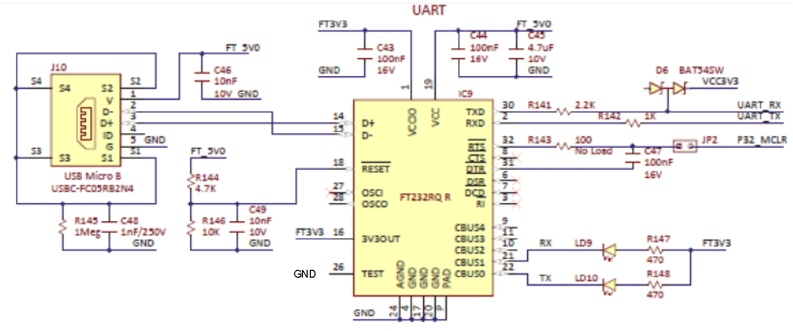 Figure A.1. PIC32 to FT232RQR IC schematic diagram.
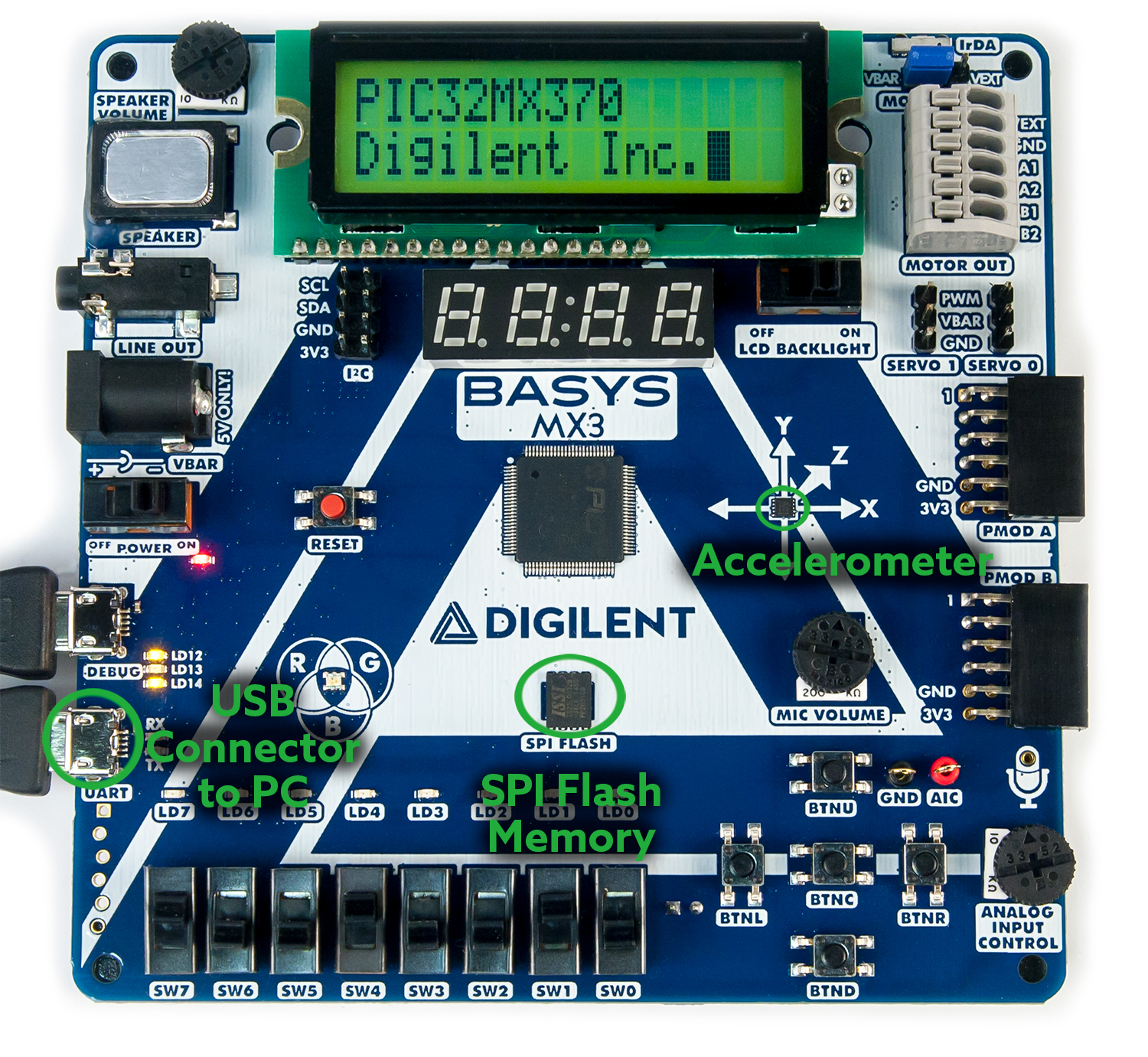 Figure A.2. Unit 4 hardware and instrumentation configuration.
Appendix B: Lab 4a and 4b UART Functions
Listing B.1. C Function that Initializes PF12 and PF13 to UART 4
void uart_init(unsigned int baud, int parity)
{
// The next two statements map the PPS IO pins to the UART 4 Tx and Rx
   RPF12R = 0x02;  // Mapping U4TX to RPF12;
   U4RXR = 0x09;   // Mapping U4RX to RPF13

   UARTConfigure(UART4, UART_ENABLE_PINS_TX_RX_ONLY );
   UARTSetDataRate(UART4, GetPeripheralClock(), baud);	// Set UART data rate
// Note the need to specify the UART number twice in the following statement
   UARTEnable(UART4, UART_ENABLE_FLAGS(UART_ENABLE | UART4 | UART_RX | UART_TX));
   switch(parity)
   {
       case NO_PARITY:
           UARTSetLineControl(UART4, UART_DATA_SIZE_8_BITS | UART_PARITY_NONE |\
                              UART_STOP_BITS_1);
           break;
       case ODD_PARITY:
           UARTSetLineControl(UART4, UART_DATA_SIZE_8_BITS | UART_PARITY_ODD |\
                              UART_STOP_BITS_1);
           break;
       case EVEN_PARITY:
           UARTSetLineControl(UART4, UART_DATA_SIZE_8_BITS | UART_PARITY_EVEN |\
                              UART_STOP_BITS_1);
           break;
   }
   printf("\n\rUART Serial Port 4 ready\n\n\r");
Listing B.2. C code to allow the “printf” output to be redirected to UART 4
void _mon_putc(char c)
{
   while(!UARTTransmitterIsReady(UART4));
   UARTSendDataByte(UART4, c);
} /* End of _mon_putc */
Listing B.3. C Code for Sending a Single Character to UART 4
BOOL putcU4( int ch)
{
UART_DATA c;
BOOL done = FALSE;
   c.data8bit = (char) ch;
   if(UARTTransmitterIsReady(UART4))
   {
   	UARTSendDataByte(UART4, c.data8bit);
	done = TRUE;
   }
  return done;
} /* End of putU4 */
Listing B.4. C Code for Receiving a Single Character from UART 4
BOOL getcU4( char *ch)
{
UART_DATA c;
BOOL done = FALSE;
   if(UARTReceivedDataIsAvailable(UART4))	/* wait for new char to arrive */
   {
       c = UARTGetData(UART4);	/* read the char from receive buffer */
       *ch = (c.data8bit);
       done = TRUE;		/* Return new data available flag */
   }
   return done;           /* Return new data not available flag */
}/* End of getU4 */
Appendix C: Common Definitions
- UART: A Universal Asynchronous Receiver/Transmitter, abbreviated UART, is a type of “asynchronous receiver/transmitter,” a piece of computer hardware that translates data between parallel and serial forms. UARTs are commonly used in conjunction with communications standards such as EIA, RS-232, RS-422, or RS-485 that describe physical layers.
- Communications Speed: BAUD is a unit used to measure the speed of signaling or data transfer, equal to the number of pulses or bits per second, or baud rate.
- Data Rate: Typical data rates are multiples of 120 BAUD to 115.2 KB.
- Stop Bits: Only one is necessary for the receiving device. The sending device has the option of sending one or two minimum stop bits.
- Bus Idle: This is the nominal state of the data signal when no data is being transmitted. The idle condition is a logic level 1 (or high condition). The bus idle condition is an extension of stop bits; however, the period bus idle condition may be any time duration.
- Parity: Used for single bit error detection.
- None – no error checking
- Even parity refers to a parity checking mode in asynchronous communication systems in which an extra bit, called a parity bit, is set to one if there is an odd number of one bits in a one-byte data item.
- Odd parity refers to a parity checking mode in asynchronous communication systems in which an extra bit, called a parity bit, is set to one if there is an even number of one bits in a one-byte data item.
- Information direction:
- Simplex – communications is one direction only
- Full-duplex – bi-directional simultaneous asynchronous communications
- Half-duplex – bi-directional exclusive communications. Devices can send and receive, but not simultaneously.
1)
Universal asynchronous receiver/transmitter, https://en.wikipedia.org/wiki/Universal_asynchronous_receiver/transmitter